


A website for people with disabilities must comply with the WCAG 2.1 AA standard, which is the legal requirement under European Directive 2016/2102 and for NSRF (ESPA) funding programmes. Since October 2023, WCAG 2.2 has also been in force (recommended for future-proof projects). WCAG 2.0 is now outdated and does NOT cover modern requirements (mobile, cognitive disabilities, low vision). In this guide you will find: the 4 POUR principles, a comparison of the A/AA/AAA levels, a 12-step checklist, legal obligations and fines, and how to run an audit.
July 2026 update: for private businesses, accessibility is now mandatory since 28/6/2025 under Greek Law 4994/2022, with fines of up to €100,000. See the details: Fines of up to €100,000: what applies to websites and e-shops.
Need your site checked and fixed? See our WCAG 2.1 AA Website Accessibility service or ask for a quote.
In all NSRF (ESPA) funding programmes, a basic requirement is that any website built must comply with the WCAG 2.1 AA standard for people with disabilities.
Having such a website makes access easier for people with disabilities, who can navigate your website easily. A website built for easy access by people with disabilities doesn’t have to be ugly or have fewer features than other websites that don’t follow the standards.
Of course, the standards set certain limits that stop web designers from giving free rein to their imagination, yet even within these limits websites can look stunning.
What are the requirements for an accessible website under the WCAG 2.1 AA standard
The answer is complex, but correct contrast, error-free code and a website that passes the WAVE (WebAIM) check at AA level are a good start on the road to success.
NSRF (ESPA) or LEADER programmes usually require websites to be at least bilingual. Take great care, because every page of the website must pass the accessibility check with the https://wave.webaim.org/ tool
All WCAG criteria are grouped into 4 principles. Every WCAG-related page MUST include them.
| Principle | Meaning | Example criterion |
|---|---|---|
| Perceivable | Information must be perceivable | Alt text on images, captions on video, color contrast 4.5:1 |
| Operable | The page must be navigable without a mouse | Keyboard navigation, enough time, no seizure-inducing content |
| Understandable | Content and controls must be clear | Plain language, predictable navigation, error identification |
| Robust | Compatibility with assistive technologies | Valid HTML, correct ARIA labels, name/role/value for every element |
A vs AA vs AAA Levels
| Level | What it means | When you need it |
|---|---|---|
| Level A | Basic: minimum compliance | Not enough for NSRF (ESPA) or the public sector |
| Level AA | Industry standard: required by the EU/NSRF (ESPA) | ✅ All private and subsidised websites |
| Level AAA | Highest compliance: not practical for everything | Government, healthcare, education |
Examples of websites built for people with disabilities
It’s better to talk through examples and give an idea of what we mean when we call a website beautiful or ugly.

The website for Sunset Peramos rooms to let is objectively a beautiful website with an availability enquiry feature, and at the same time it meets the specifications for people with disabilities. We should also point out that this website is bilingual, optimised for mobile devices and built on wordpress

Another example of a website built to these standards is the website of Liza Kalfa, a psychologist in Katerini. Her website is accessible to people with disabilities, yet its look and functionality remain at a high level. Despite the limits set by the standards, this site has nothing to envy in other psychologists’ websites .
What does a site need to meet the rules/guidelines for people with disabilities?
There are 3 WCAG levels: A, AA and AAA. For your website to reach the highest level, it must do the following:
- Provide text alternatives for non-text content.
- Provide captions and other alternatives for multimedia.
- Create content that can be presented in different ways, including by assistive technologies, without losing its meaning.
- Make it easier for users to see and hear content.
- Make all functionality available from a keyboard.
- Give users enough time to read and use the content.
- Do not use content that causes seizures.
- Help users navigate and find content.
- Make text readable and understandable. Make content appear and operate in predictable ways.
Some of the basics a website must follow to comply with the rules above are valid HTML with no errors and strong colour contrast. If the site is going to be checked for NSRF (ESPA) or LEADER funding, the authorities provide a list of tools that must be used to produce certificates stamped by the website’s developer.
NSRF (ESPA) compliance checklist
| # | WCAG 2.1 AA requirement | What it means in practice |
|---|---|---|
| 1 | Color contrast ≥ 4.5:1 (text) | No light grey on white |
| 2 | Alt text on all images | Descriptive, not “image1.jpg” |
| 3 | Keyboard navigation | All controls reachable with Tab |
| 4 | Visible focus indicator | You can see where you are when using the keyboard |
| 5 | Semantic HTML (h1, h2, nav, main) | No “divitis” |
| 6 | ARIA labels where needed | On custom controls / icons |
| 7 | Form labels & error messages | Every input has a label, errors are clear |
| 8 | Captions/transcripts on video | Subtitles on all media content |
| 9 | Resizable text up to 200% | Layout doesn’t break when zoomed |
| 10 | Reflow at 320px width | Mobile-friendly, no horizontal scroll |
| 11 | Lang attribute in the HTML | <html lang=”el”> |
| 12 | Accessibility statement page | States the level of compliance |
How to make your website WCAG 2.1 AA compliant in 12 steps
Step-by-step checklist for WCAG 2.1 AA compliance, the legally required standard for NSRF (ESPA) programmes and public-sector websites in Greece. Covers color contrast, keyboard navigation, semantic HTML, ARIA labels, mobile reflow and the accessibility statement.
PT4W
Color contrast audit
Check that all text on the page has a contrast ratio of at least 4.5:1 against the background (3:1 for large text over 18pt). Use the WebAIM Contrast Checker (webaim.org/resources/contrastchecker/) to test colours. Fix every case where light grey text sits on a white background.
Alt text on all images
Add descriptive alt text to every image on the site. The alt text should describe what the image shows and what it does. For decorative images with no meaning, use an empty alt=””. Avoid generic text such as “image1.jpg” or “banner.png”. Pay particular attention to logos, icons and product images.
Keyboard navigation
Try navigating the whole page using only the keyboard (Tab to move, Enter or Space to click). All interactive elements (links, buttons, forms, menus) must be reachable. Fix elements that can only be activated with a mouse (hover-only menus, custom dropdowns).
Visible focus indicator
Add CSS :focus styles to all interactive elements so it is clear which element the user is on when navigating with the keyboard. The outline should be at least 2px thick and have a contrast of ≥3:1 with the background. Don’t remove the browser’s default outline without adding your own.
Semantic HTML
Replace generic divs with semantic HTML5 elements: <header> for the header, <nav> for navigation, <main> for the main content, <article> for articles, <aside> for the sidebar, <footer> for the footer. Use a correct heading hierarchy (one H1 per page, then H2, H3 in logical order).
ARIA labels and roles
Add aria-label, aria-labelledby or aria-describedby to custom controls, icon-only buttons and interactive widgets. Example: <button aria-label=”Close menu”>×</button>. For custom dropdowns or modals, use the right ARIA roles (role=”dialog”, role=”menu”, aria-expanded etc.).
Form labels and error handling
Every <input>, <select> and <textarea> must have a matching <label> (via for/id or by wrapping). Error messages must be accessible via aria-describedby and appear close to the field with the problem. Use aria-required and aria-invalid where needed.
Captions and transcripts for media
All videos on the page must have closed captions (CC) in the page language (Greek, for a Greek site). Audio content (podcasts, voice-overs) needs a text transcript. Auto-generated captions from YouTube/Facebook are usually not accurate enough, so they need reviewing.
Resizable text up to 200%
Try zooming the page up to 200% (Ctrl + plus, or zoom through the browser settings). The layout must not break, text must not be cut off and controls must keep working. Avoid fixed pixel sizes; use rem or em for font-size.
Mobile reflow at 320px
Test the page at a 320px viewport width (the smallest smartphone size). There must be no horizontal scroll, and all controls must be touch-friendly (min 44x44px target size for WCAG 2.1, 24×24 for 2.2). The menu must switch to a mobile-friendly version.
Lang attribute in the HTML
Make sure the <html> tag has the right lang attribute: <html lang=”el”> for Greek content. If you have a multilingual site, each language must have its own lang. For an inline change of language within a paragraph, use <span lang=”en”>English text</span>.
Accessibility statement page
Create a page at /accessibility-statement (or /dilosi-prosvasimotitas) stating: the WCAG compliance level (e.g. WCAG 2.1 AA), known exceptions, contact details for reporting accessibility problems, and the date of the last check. This is mandatory for compliance with Greek Law 4727/2020.
Why build a website to the WCAG 2.1 AA standard?
Making your site comply with WCAG 2.1 AA brings a host of advantages, both for users and for your business itself.
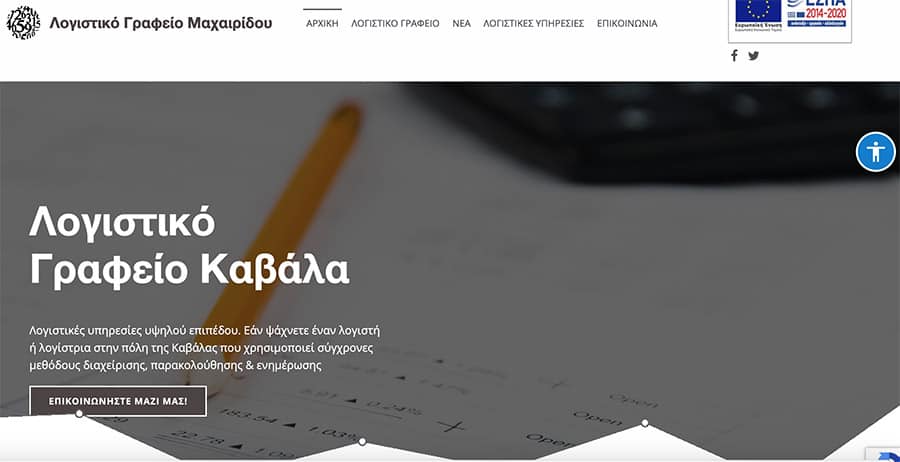
Apart from your corporate and social responsibility towards people with disabilities, following the standards is also good for your website itself. When the standards are followed, you get a bonus from search engines when it comes to promoting your website on them. Below is an example of a website for an accountant in Kavala that follows the accessibility standards and has been rewarded by google . Of course, the website is fully functional and optimised for speed.
The ease of access that comes from following the rules makes for happy users, and happy users are happy customers.
How much does a website for people with disabilities cost?
A website for people with disabilities built to the WCAG 2.1 AA standard costs the same as a normal website or e-shop ; depending on the client’s requirements it can cost from 1500 to 5000 euros (perhaps more, depending on what the client asks for). The only extra cost is the work needed to check the website with the right tools, so that the right certificates can be produced if the business joins an NSRF (ESPA) programme.
At Web-Mate we have built hundreds of websites to all of the above, both for our clients and for fellow developers who can’t take on this demanding process. If you want a website that meets all the specifications above, talk to us!
What fines do you risk without WCAG 2.1 AA
Careful: there are two separate regimes, and they are often confused. For private businesses, Greek Law 4994/2022 (implementing the European Accessibility Act) applies: compliance has been mandatory since 28/6/2025, with administrative fines of up to €100,000, compliance orders and the possibility of the service being suspended. Law 4727/2020 covers the public sector. For NSRF (ESPA) funding: if the site fails the final compliance check, the grant may be cancelled and the money may have to be repaid.
Which WCAG standard applies to accessible websites today?
Since 2018, WCAG 2.1 at level AA has applied, and it is legally required by European Directive 2016/2102 and NSRF (ESPA) programmes. Since October 2023 there has also been WCAG 2.2, with 9 additional criteria: optional, but recommended for future-proof projects. WCAG 2.0 is now outdated.
What are the WCAG POUR principles?
POUR are the 4 fundamental principles of WCAG: Perceivable: information must be perceivable through alt text, captions and sufficient contrast. Operable: the page must work without a mouse (keyboard navigation). Understandable: content and controls must be clear, with plain language and predictable navigation. Robust: compatibility with assistive technologies through valid HTML and correct ARIA labels.
What is the difference between WCAG levels A, AA and AAA?
Level A is the basic level of compliance (minimum) and is not enough for NSRF (ESPA). Level AA is the industry standard and the level legally required by the European Union; all NSRF (ESPA)-funded websites must meet it. Level AAA is the highest compliance and is recommended for government, healthcare and education websites, though it is not always achievable for all the content on a page.
Is WCAG 2.0 enough for NSRF (ESPA) programmes?
Careful: there are two separate regimes, and they are often confused. For private businesses, Greek Law 4994/2022 (implementing the European Accessibility Act) applies: compliance has been mandatory since 28/6/2025, with administrative fines of up to €100,000, compliance orders and the possibility of the service being suspended. Law 4727/2020 covers the public sector. For NSRF (ESPA) funding: if the site fails the final compliance check, the grant may be cancelled and the money may have to be repaid.
What are the basic WCAG 2.1 AA requirements?
The 12 most critical WCAG 2.1 AA requirements are: color contrast of 4.5:1 for text, alt text on all images, keyboard navigation, a visible focus indicator, semantic HTML, correct ARIA labels, form labels and clear error messages, captions or transcripts on video, resizable text up to 200%, mobile reflow at 320px with no horizontal scroll, a correct lang attribute in the HTML, and a dedicated accessibility statement page.
How do I check whether my website is WCAG-compliant?
Use the following tools: WAVE from WebAIM (wave.webaim.org), the axe DevTools Chrome extension, the Lighthouse Accessibility audit in Chrome DevTools, and the WCAG-EM Report Tool. Full certification needs a manual audit by a specialist and testing with real users with disabilities or with assistive technologies such as screen readers.
How much does a WCAG 2.1 AA compliant website cost?
Careful: there are two separate regimes, and they are often confused. For private businesses, Greek Law 4994/2022 (implementing the European Accessibility Act) applies: compliance has been mandatory since 28/6/2025, with administrative fines of up to €100,000, compliance orders and the possibility of the service being suspended. Law 4727/2020 covers the public sector. For NSRF (ESPA) funding: if the site fails the final compliance check, the grant may be cancelled and the money may have to be repaid.
What is the difference between WCAG 2.1 and 2.2?
WCAG 2.2 (October 2023) adds 9 new criteria to 2.1, focusing on: focus appearance (a visible focus with specific contrast), dragging movements (alternatives to drag-and-drop), target size (a minimum of 24×24 pixels for clickable elements) and cognitive accessibility improvements. 2.1 remains the legal requirement, while 2.2 is recommended for new projects that want future-proof compliance.
How long does it take to make my website WCAG-compliant?
For a new website built from scratch to WCAG 2.1 AA: 4-8 weeks (15-20% more time than a non-compliant build). To retrofit an existing site: 2-6 weeks, depending on its size and how far it is from compliance. The audit and remediation plan alone take 1-2 weeks.



Leave a comment